The Internet’s Secret Blueprint: Understanding the OSI Model in Plain English
Every time you send a message, stream a video, or load a webpage, a carefully organized process happens behind the scenes. Data doesn’t just magically jump from your device to a server halfway around the world. It moves through a series of steps, each with a specific job. The OSI Model is the classic blueprint that explains those steps.
Think of it as a seven-layer cake or a set of stacked departments in a big shipping company. Each layer handles one part of the job and then hands the data to the next layer. You don’t need to be a network engineer to understand the big idea—and once you do, the internet makes a lot more sense.
What Exactly Is the OSI Model?
OSI stands for Open Systems Interconnection. It is a conceptual framework created in the 1980s to help people understand and design computer networks. It divides the complex process of network communication into seven clear layers, from the physical wires and radio waves all the way up to the applications you actually use.
Important note: The modern internet mostly runs on a simpler model called TCP/IP. The OSI Model is still extremely useful as a teaching tool and a common language for troubleshooting. When network experts talk about “Layer 3 issues” or “something wrong at Layer 2,” they are using the OSI Model as their reference.
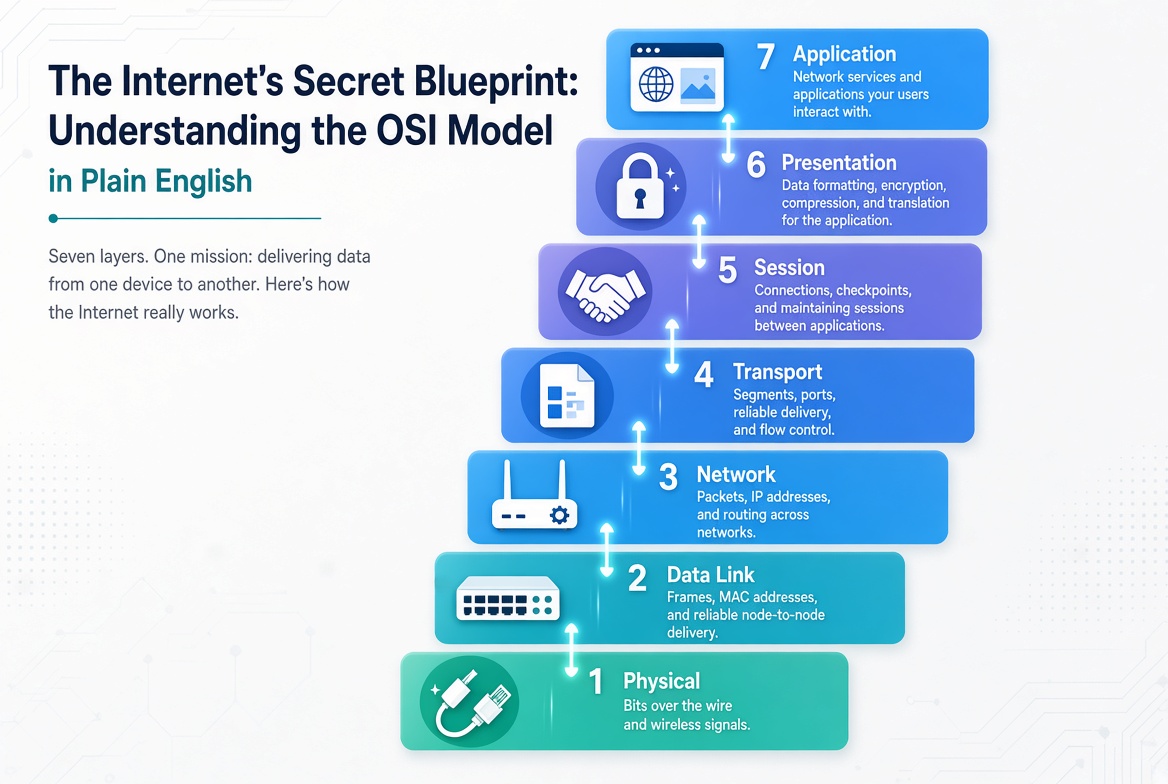
The Seven Layers Explained Simply
Here is each layer, starting from the bottom (closest to the hardware) and moving up to the top (closest to you).
-
Physical Layer – The Actual Road
This is the hardware level: cables, fiber optics, Wi-Fi radio waves, electrical signals, and connectors. Its only job is to move raw bits (1s and 0s) from one place to another. If the cable is unplugged or the Wi-Fi signal is too weak, everything stops here. -
Data Link Layer – Local Delivery and Error Checking
This layer makes sure data can travel reliably across a single local network (like your home Wi-Fi or an office Ethernet). It packages bits into frames, adds physical addresses (MAC addresses), and detects basic errors. Network switches and the Wi-Fi connection inside your router work mainly at this layer. -
Network Layer – Finding the Best Path Across Networks
This is where routing happens. The Network layer adds logical addresses (IP addresses) and decides how packets should travel from one network to another across the internet. Routers live here. When your data travels from your home to a YouTube server, the Network layer is responsible for choosing the path. -
Transport Layer – Reliable Delivery End to End
This layer makes sure the complete message arrives correctly and in order. It breaks big chunks of data into smaller pieces, numbers them, checks for missing pieces, and asks for retransmissions if needed. The two most famous protocols here are TCP (reliable, like a tracked package) and UDP (faster but less careful, like a postcard). -
Session Layer – Managing the Conversation
This layer sets up, maintains, and ends the “conversation” between two devices. It keeps track of whose turn it is to talk and can reopen a session if the connection drops briefly. You can think of it as the part that keeps a video call or a file transfer organized. -
Presentation Layer – Translating and Formatting
Data often needs to be converted into a common format, compressed, or encrypted. The Presentation layer handles these translations so that different systems can understand each other. Encryption (such as the TLS that powers HTTPS) and data compression often happen at this level. -
Application Layer – What You Actually See and Use
This is the top layer—the one closest to you. It includes the protocols and services that applications use directly: web browsing (HTTP/HTTPS), email, file transfers, domain name lookups, and more. When you open a browser or an app, you are interacting with the Application layer.
How the Layers Work Together
When you send data, it starts at the Application layer and moves down through each layer. Every layer adds its own information (like putting a letter into an envelope, then into a package, then into a shipping container). At the receiving end, the process happens in reverse: each layer removes its information and passes the data upward until it reaches the application on the other device.
This step-by-step approach keeps the system organized. Engineers can focus on improving one layer without redesigning everything else. It also makes troubleshooting easier—if a problem occurs, specialists can narrow it down to a specific layer instead of searching the entire network at once.
Why the OSI Model Still Matters
Even though real-world networks don’t follow the OSI Model in a rigid way, it remains one of the most valuable tools for understanding networking. It gives students, technicians, and engineers a shared mental map. It helps explain why some problems affect only local connections while others involve routing across the internet. And it provides a clear way to talk about security, performance, and design decisions.
When something goes wrong—slow video, a website that won’t load, or a VPN that keeps dropping—thinking in layers often leads to the solution faster.
A Simple Summary
The OSI Model is a seven-layer framework that breaks network communication into understandable pieces. From the physical cables and radio signals at the bottom to the apps you use at the top, each layer has a clear responsibility. Together they turn the complex process of moving data across the internet into something structured and manageable.
You don’t need to memorize every detail to appreciate the idea. The next time a webpage loads or a video starts playing, you can picture the data traveling up and down those seven layers—quietly, efficiently, and according to a blueprint that has helped people understand networking for decades.